Explore CryptoSlate’s Institutional Playbook, a 3-part guide series on exchange due diligence, crypto-as-a-service, and token listing strategy for institutional teams.
Explore CryptoSlate’s Institutional Playbook, a 3-part guide series on exchange due diligence, crypto-as-a-service, and token listing strategy for institutional teams.
Best for Crypto.com App users who want an instant virtual card and high crypto rewards. Earn up to 5% back in CRO (Cronos); lower tiers add a foreign fee and crypto conversion costs.
IssuerRegion-specific issuers (e.g., Community Federal Savings Bank—US; Foris entities—EEA/UK/SG/AU; Digital Commerce Bank—Canada).
Program PartnerVisa network for Visa programs; Mastercard partnership/principal issuance for GCC program.
AvailabilityAvailable in many regions (e.g., US, EEA/UK, SG, CA, AU, BR) with residency-based eligibility and restricted markets per Crypto.com lists.
RewardsUp to 8% back in CRO, tiered (plan/stake) with monthly caps and exclusions by MCC/market.
FeesRegion/tier dependent; examples: ATM 2% above monthly free allowance (EU/US), card top-up fees (EU: 1%; US: debit 1%, credit 2.99%, PayPal 2.1%), and foreign transaction fees may apply by tier (e.g., US: 3% for some tiers; none for higher tiers).
Daily Spend / ATM LimitTier/region-based limits (examples: US POS $10k–$25k/day; EU POS €25k/day; ATM often up to $/€2k/day; monthly free ATM allowance varies by tier).
Funding SourceTop up from Crypto.com fiat/cash account, crypto wallet conversions, bank card top-ups (and PayPal in the US); some regions support onchain top-up flows via swaps.
Digital WalletsApple Pay, Google Pay, Samsung Pay
Virtual Card & ShippingInstant virtual card for online spend; physical delivery typically ~7–14 business days (some regions differ).
Crypto.com Card Screenshots
Crypto.com Card Pros and Cons
Pros
Up to 5% CRO back with instant rewards.
No annual fee and high spending limits.
Instant virtual card and strong mobile wallet support.
Cons
3% foreign fee on lower tiers (US market).
Monthly cashback caps on mid tiers.
Requires a monthly fiat subscription or a 12-month CRO lockup to earn rewards.
Crypto funding includes a conversion spread.
What Crypto.com Visa Card is and How it Works
Crypto.com Visa debit card product hero image with create account call to action.
The Crypto.com Visa is a prepaid debit card you load in the app using cash, USDC, or other crypto. On this card, crypto is sold to fiat at top‑up, then you spend the loaded fiat anywhere Visa is accepted. Selling crypto to load the card can be a taxable disposal in many jurisdictions. Most users can get one if the card is offered in their country and they complete standard KYC.
In the Card tab you choose the funding source before you top up. Using cash or stablecoins avoids crypto conversion when you pay. Expect standard pre‑authorisations at fuel stations and hotels, which release after the merchant settles. Refunds return to your card balance once processed. See Fees and conversion costs for the spread and other mechanics.
Crypto.com Visa Card Rewards Mechanics
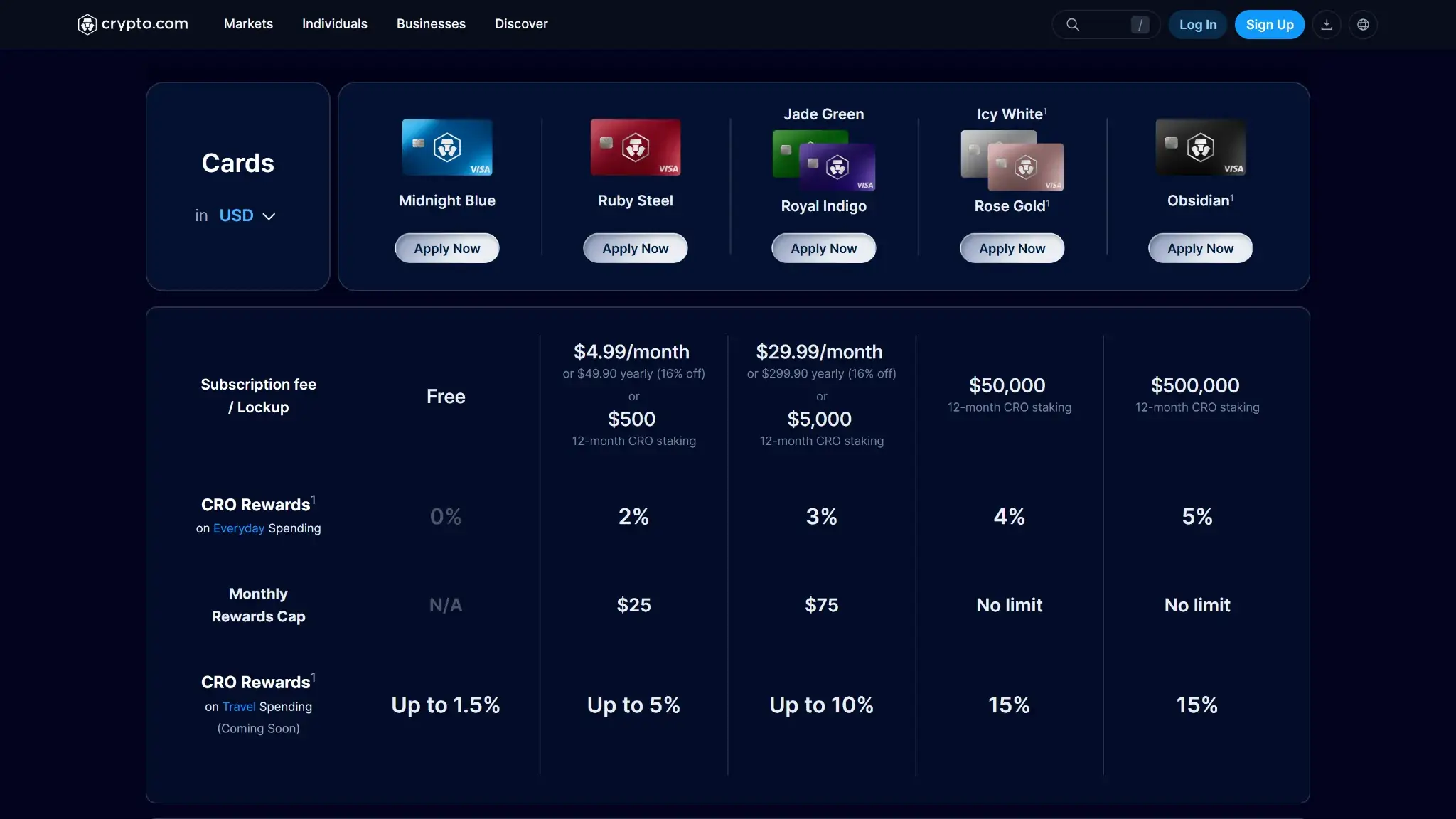
Crypto.com cards comparison table showing tier options, subscription or CRO lockup requirements, and CRO rewards rates.
Element
Value
Notes (eligibility, rotation, exclusions)
Base reward rate
0% (Midnight Blue)
Entry tier has no cashback.
Top reward rate
Up to 5% back
Obsidian and higher private tiers.
Reward currency
CRO (Cronos)
Fixed payout in CRO; no alternative reward coin.
Payout cadence
Instant after purchase
Posts within seconds in the app; reversals on refunds.
Caps / minimums
Monthly caps on lower tiers
Caps apply on Plus/Pro; none on Icy/Obsidian.
Exclusions
Cash‑like, bill pay, ATM
Standard non‑purchase categories do not earn.
Rewards are straightforward and tied directly to your chosen card tier. To earn cashback (which starts at 2% on Ruby Steel and goes up to 5% on Obsidian), you must meet the tier's requirement via a “Subscription fee / Lockup.” You can fulfill this by either paying a flat fiat subscription (e.g., $4.99/€3.99 a month for Ruby Steel) or by staking a required amount of CRO for 12 months. If you choose the free tier (Midnight Blue) and do neither, your base reward rate is 0%. Cashback posts immediately in CRO, which can rise or fall in fiat terms.
How it compares: Crypto.com’s headline rate of up to 5% is highly competitive, though it is not the absolute highest ceiling in the market. For instance, the Bybit Card (for EU users) can reach up to 10% for top-tier VIPs, while the Coinbase Card offers varying rates without requiring any upfront staking commitments.
Where Crypto.com still stands out is its instant payout mechanics, 0% FX fees on premium tiers, and the flexibility of its requirements—allowing you to pay a monthly fiat subscription if you prefer not to lock up volatile CRO. However, being restricted to CRO-only rewards and navigating monthly cashback caps on the lower tiers remain the primary trade-offs.
Crypto.com Visa Card Fees and Pricing
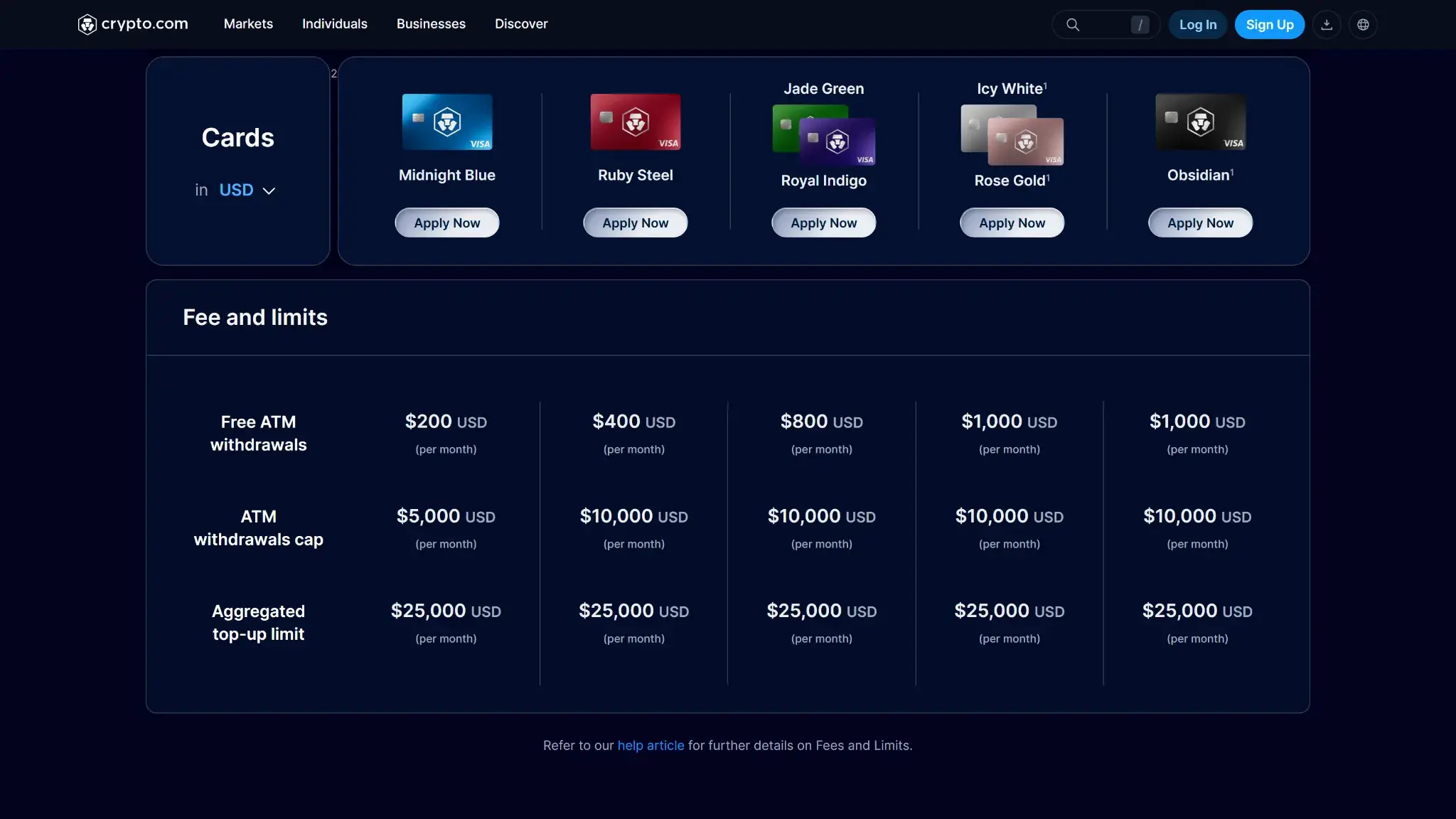
Crypto.com cards page showing Visa tier options and a fee and limits table for ATM and top-up limits.
Fee or charge
Amount / rate
When it applies
Region / notes
Annual fee
$0
Per card per year
No monthly fee to keep the prepaid card active. Optional Level Up subscription if you choose not to stake CRO.
Foreign transaction
0% on Icy White and Obsidian · 3% on Midnight Blue, Ruby, Jade
Non‑domestic purchases and foreign ATM
Tier based. Check your local Fees page for country specifics.
ATM (domestic)
Free up to monthly allowance, then 2% · ATM owner fee may apply
Per cash withdrawal
Free allowance by tier: roughly $200–$1,000 per month. Excess charged at 2%.
ATM (international)
Free within allowance plus FX per tier · 2% after allowance
Per cash withdrawal
Visa FX rate used. Lower tiers add a 3% foreign fee on the withdrawal.
Replacement card
$7 (Blue) · $50 (Ruby and above)
Lost, stolen, or reissue
Shipping in about 7–14 business days in most regions.
Conversion spread
Variable spread applies
Crypto → fiat when topping up or spending from crypto
Reduces net rewards and raises effective cost when you fund with volatile crypto.
if you fund or spend using non‑stablecoin crypto, the platform converts that crypto to fiat at a held exchange rate that includes a small markup. You do not see a separate fee line, but you effectively pay slightly more for the purchase than the mid‑market rate. Topping up with cash or stablecoins avoids this hidden cost.
In comparison to other crypto cards, the overall ownership cost is low since there is no annual fee and ATM access is generous up to the free allowance. However, the 3% foreign fee on lower tiers makes international use expensive compared with alternatives like Coinbase Card or Gemini Credit Card that have no FX fees. Premium Crypto.com tiers remove the foreign fee and keep ATM costs predictable, which is competitive for frequent travelers who can meet the tier requirements.
Crypto.com Visa Card Limits — Purchase and ATM
Transaction type
Per‑transaction limit
Daily limit
Notes (how to increase, verifications)
Card purchase
$10,000 per transaction on Ruby and higher · $5,000 on Midnight Blue
$25,000 per day on Ruby and higher · $10,000 on Midnight Blue
Limits are tied to card tier and require full KYC at signup. Upgrading tier raises caps.
ATM cash withdrawal
$1,000 per withdrawal on metal tiers · $500 on Midnight Blue
Up to $2,000 per day on metal tiers · $500 on Midnight Blue
Monthly ATM cash cap typically $10,000 on metal tiers and $5,000 on Blue.
Contactless tap
Local per‑tap cap applies
—
Follows local terminal rules. Apple Pay and Google Pay allow higher authenticated taps.
The prepaid limits are fixed by tier. There is no ad‑hoc increase via support. To raise caps you must upgrade to a higher tier after completing full KYC. You can check your remaining daily and monthly limits in the app under Card → Limits.
Declines most often occur due to insufficient card balance, limit reached, prohibited MCC, or a temporary security hold. Daily limits and free ATM allowances reset on a calendar basis, so a transaction that failed late today may succeed after the reset.
Eligibility and Availability — Countries and States
Regions supported: United States, United Kingdom, European Economic Area, Canada, Australia, Singapore, and Brazil, with ongoing rollout to select LATAM markets. Card availability depends on the local issuing entity and regional rules.
U.S. states: Available in 49 states and Washington, D.C.. Not available in New York. U.S. territories have app access but no prepaid card issuance.
Age & KYC:18+ and full KYC on Crypto.com required. Expect government ID, selfie liveness, and proof of address if flagged (as required by most crypto exchanges). Additional screening may apply for higher tiers or unusual activity.
Not supported: Service is restricted in sanctioned or high‑risk jurisdictions. Users in those markets cannot apply or use the card.
Digital wallets:Apple Pay and Google Pay supported in US, EU, Canada, Australia. UK not supported for Apple Pay or Google Pay. Singapore supports Google Pay only.
Other prerequisites: Active Crypto.com App account, successful card application in‑app, and a funding source for top‑ups. No minimum income for the prepaid card.
Official coverage link: Crypto.com Help Center → Prepaid Card collection → Country and state availability.
Apple Pay and Google Pay support differs by region. UK‑issued cards currently cannot be added to Apple Pay or Google Pay, while most US and EU users can. Always verify the local Fees & Limits and Digital wallet articles before applying.
UX and Support for Crypto.com Visa Card
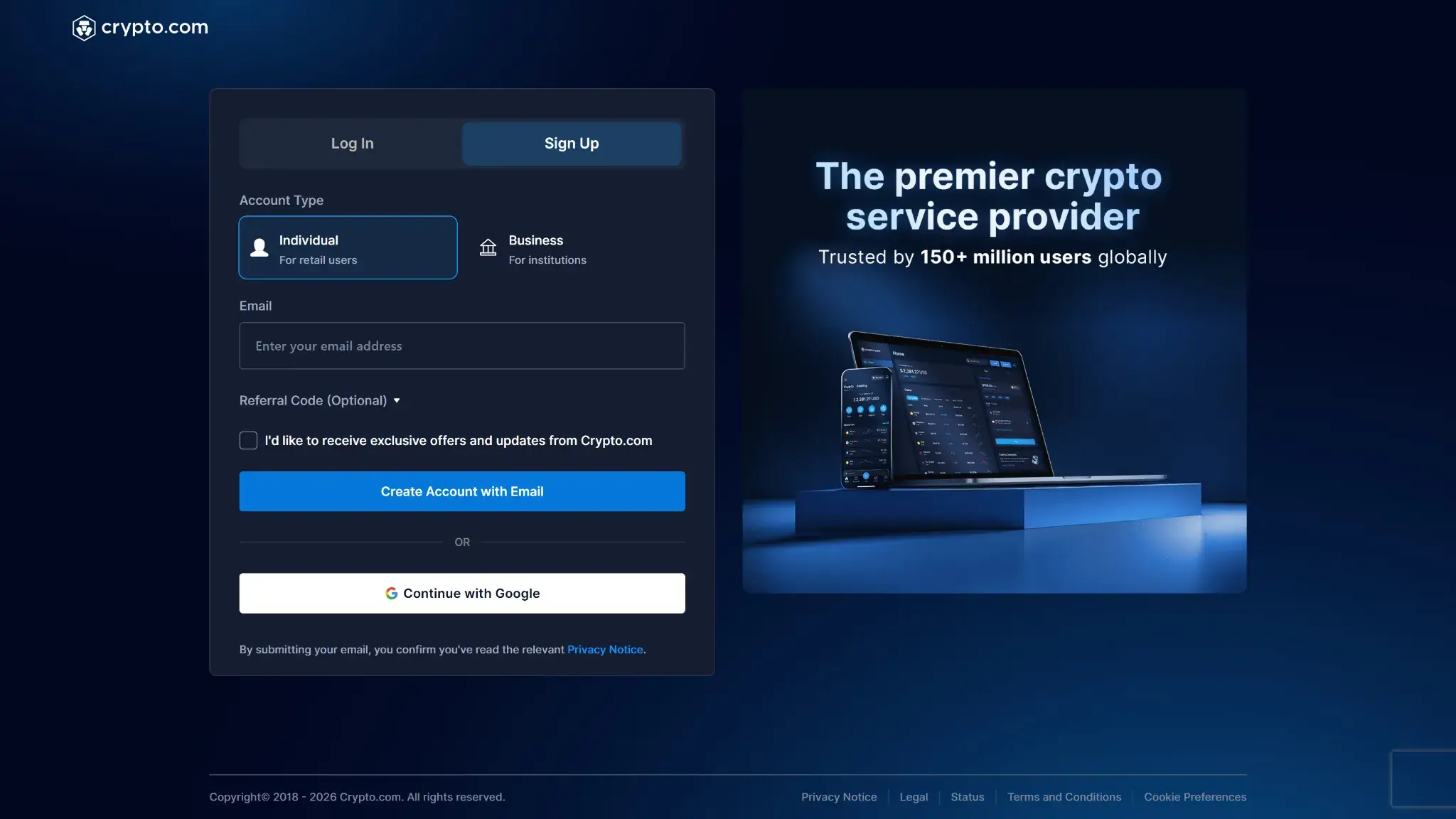
Crypto.com sign up page showing account type selection and email registration form.
Users highlight a smooth app experience and instant rewards. The virtual card appears right after approval, and Apple Pay or Google Pay setup is quick in supported regions. Real‑time push alerts and a fast card freeze toggle help with day‑to‑day security. Many also like the premium feel of the metal card on higher tiers.
The main friction points are customer support wait times, benefit changes that reduce rewards for lower tiers, and occasional shipping delays. Community threads often resolve basic questions faster than official chat, which can be slow during peak periods. Overall sentiment is positive for users who understand the tier rules and top‑up with fiat or stablecoins to avoid conversion costs.
How to apply for Crypto.com card and get started
Install the Crypto.com App and complete KYC with your ID and selfie.
Open the Card tab and choose a Level Up plan that matches your desired tier.
Join the plan by staking CRO or paying the subscription shown in‑app.
Submit the card application with your legal name and delivery address.
Receive your virtual card instantly and add it to Apple Pay or Google Pay where supported.
Activate the physical card when it arrives, set your PIN, and enable alerts.
How to add money to the Crypto.com card
Open the Card tab and tap Top Up. Choose Cash Account for fiat, Crypto Wallet to convert supported coins, or debit/credit card in regions that allow it. The balance loads instantly and is ready to use. Auto Top‑Up is available in supported markets and will convert a chosen crypto into your card currency when your balance drops.
You can top up frequently. Many users load fiat or USDC to avoid conversion spreads at the point of sale. Refunds return to your card balance once the merchant settles. For large purchases, top up in advance and confirm your remaining daily limits under Card → Limits.
Security and App Experience
Crypto.com security page titled ‘Security First, Always' with a safe dial graphic.
Crypto.com secures the card with TOTP 2FA for logins and high‑risk actions — hardware security keys are not supported. The Card tab provides instant freeze or unfreeze, PIN set and change, and secure in‑app access to the full card number after a biometric check. You receive real‑time alerts, basic spending summaries and merchant tags. A public status page lists outages and maintenance. Standard Visa zero‑liability applies for unauthorized transactions, with details in the in‑app cardholder agreement. Overall the controls are solid and competitive, with faster on‑device switches than many banks.
Alternative Cards Like Crypto.com Visa Card
Coinbase Card — No token stake required and no FX fee for US users. Earning rewards in multiple coins offers great flexibility, making it a strong alternative if you want to avoid Crypto.com’s CRO ecosystem commitment and the new Level Up subscription fees.
Gemini Credit Card — True credit card with up to 3% back and no foreign fees. Avoids pre‑funding and cuts conversion spread risk for everyday spending.
Bybit Card (EEA) — A strong European alternative offering up to 10% cashback for VIP users and easy off-ramping.
Nexo Card — Spend against crypto without selling and earn up to 2% back. Reduces taxable disposals and avoids hidden conversion spread.
Who Is Crypto.com Visa Card For?
The Crypto.com card suits app‑first users who want to earn CRO on everyday spend and can commit to a tier. If you keep most purchases domestic or load fiat or USDC, you avoid conversion spread and get more predictable value. High‑volume spenders and frequent travelers get the best results on Icy or Obsidian with 0% FX and larger ATM allowances. Fee‑sensitive beginners on lower tiers still benefit for casual use, but caps and the 3% foreign fee make it weaker abroad. Confirm your country or state is supported and that the daily and ATM limits fit your routine.
Final Verdict
Crypto.com Visa Card is worth it with the right tier and funding plan, albeit there're some caveats. The Crypto.com card’s strongest draw is high, instant CRO rewards up to 5% with no annual fee. The key trade‑offs are the 3% foreign fee on lower tiers and the conversion spread when you fund or spend non‑stablecoin crypto. If you plan to stake for a higher tier or load fiat or USDC, it delivers solid net value for daily purchases and travel. Review the Fees & Pricing and confirm Card Limits — Purchase & ATM match your needs before you apply.
Instant virtual card and strong mobile wallet support.
CONS
3% foreign fee on lower tiers (US market).
Monthly cashback caps on mid tiers.
Requires a monthly fiat subscription or a 12-month CRO lockup to earn rewards.
Crypto funding includes a conversion spread.
Affiliate Disclosure
Disclaimer: CryptoSlate may receive a commission when you click links on our site and make a purchase or complete an action with a third party. This does not influence our editorial independence, reviews, or ratings, and we always aim to provide accurate, transparent information to our readers.
FAQ
Does Crypto.com have a debit card and how does it work?
Yes. Crypto.com offers a prepaid Visa card you load in the app with cash, USDC, or crypto. Purchases settle in fiat, and if you fund with non‑stablecoin crypto a small conversion spread applies and the sale may be taxable. You get an instant virtual card and can add it to Apple or Google Pay where supported. See What it is and how it works.
What are the daily purchase and ATM withdrawal limits?
Most tiers allow up to $25,000 in purchases per day, while Midnight Blue is capped near $10,000. Metal tiers allow $1,000 per day at ATMs and $10,000 per month. Midnight Blue is $500 per day and $5,000 per month. Limits are fixed by tier and reset on a calendar schedule. See Card limits — purchase & ATM.
How do I increase my Crypto.com debit card limit?
You cannot request a manual increase. The prepaid limits are tied to your card tier and full KYC. To raise caps you need to upgrade to a higher tier, which increases daily purchase and ATM allowances. You can check remaining limits under Card → Limits in the app and plan large purchases accordingly.
What are the Crypto.com debit card fees and conversion spread? Is there a foreign transaction fee?
There is no annual fee. Lower tiers charge a 3% foreign transaction fee, while Icy White and Obsidian have 0% FX. ATM withdrawals are free within your monthly allowance, then 2%. Funding or spending non‑stablecoin crypto includes a small conversion spread. See Fees & pricing for the full schedule and regional notes.
How do I add my Crypto.com card to Apple Pay or Google Pay?
Open the Crypto.com app, go to the Card tab, and tap Add to Apple Wallet or Add to Google Pay. Follow the on‑screen verification. Apple and Google Pay support varies by region, with the UK currently unsupported for both and Singapore supporting Google Pay only. See Eligibility & availability and UX & Support for details.
Why was my Crypto.com card declined or my limit reached?
The card is prepaid, so the most common cause is insufficient balance. Other frequent reasons are reaching a daily or monthly limit, a prohibited merchant category, or a temporary security hold on unusual activity. Check the app’s transaction alert for the reason, then review Card limits and try again after the daily reset.
Where is the Crypto.com card available (countries and U.S. states)?
The card is available in the US (49 states, not New York), the UK, the EEA, Canada, Australia, Singapore, and Brazil, with more LATAM markets rolling out. It is not offered in sanctioned or restricted jurisdictions. See Eligibility & availability for the latest regional notes and digital wallet coverage.
Is the Crypto.com card worth it?
It is worth it if you can unlock a higher tier or fund with fiat or stablecoins. That approach avoids the 3% foreign fee on premium tiers and limits conversion spread drag. Casual users on lower tiers may get better net value from a no‑FX competitor. See Who it is for and Fees & pricing.