Beginner Why long-term crypto holders borrow against assets instead of selling A strategic guide to liquidity management, capital preservation, and the real tradeoff between selling and borrowing crypto Open guide 

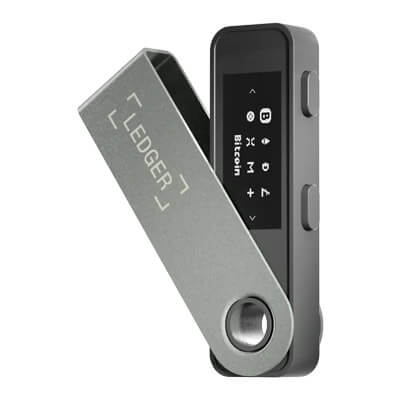
Ledger Nano S Plus is a self-custody hardware wallet from Ledger built for users who want offline key storage without paying for Bluetooth or a touchscreen. It pairs a compact two-button design with a monochrome OLED screen and supports assets such as Bitcoin, Ethereum, and Solana through Ledger’s software and compatible third-party wallets. For a closer product-level breakdown, see our Ledger Nano S Plus review.
Introduced in 2022, the Nano S Plus sits in Ledger’s lineup as the simpler cable-connected option. It uses a Secure Element chip, Ledger OS, and on-device confirmation to keep signing local to the device, while USB-C connectivity keeps the workflow focused on desktop and Android. That makes it a practical fit for long-term holders and for anyone comparing cold and hardware wallets on cost, simplicity, and everyday signing.
Ledger Nano S Plus is best suited to users who want broad asset coverage and a familiar Ledger setup without wireless features. The main trade-off is convenience: the small screen and two-button navigation are slower than newer touch models, and some assets or advanced workflows across Ethereum, Arbitrum, Polygon, and Optimism still rely on third-party wallet integrations. It can also make sense to compare it with other wallets that suit beginners if you want a simpler first step into self-custody.
| Feature | Details (as described by Ledger) |
|---|---|
| Self-custody security | Designed to keep private keys securely offline, powered by a Secure Element chip and Ledger OS. |
| Battery-free USB-C connection | Built-in USB-C, battery-free connection for use with a desktop computer or Android smartphone. |
| On-device transaction approval | Only the user can approve transactions on the Ledger Nano S Plus. |
| Trusted Display | Includes a Trusted Display screen as part of Ledger’s security model. |
| Asset coverage and app capacity | Ledger states users can manage 15,000+ coins and tokens, and install up to 100 apps (depending on app size). Ledger also notes thousands of coins, tokens, and NFTs are supported via third-party wallets, and 500+ crypto are supported via the Ledger Wallet app (including Bitcoin, Ethereum, Solana, XRP, and stablecoins, with new assets integrated regularly). |
| Ledger Wallet app pairing | Pairs with the Ledger Wallet app (formerly Ledger Live) to manage crypto transactions. |
| Category | Specification | Value |
|---|---|---|
| Finish | Materials | Brushed stainless steel and plastic |
| Connectivity | Connection type | USB type C for desktop and Android use |
| Display | Type | Monochrome OLED display |
| Display | Resolution | 128 × 64 px |
| Security | Secure Element chip | ST33K1M5 |
| Security | Chip certification | CC EAL6+ |
| Security | Operating system | Ledger OS |
| Size and weight | Dimensions | 62.4 mm × 17.4 mm × 8.2 mm |
| Size and weight | Weight | 21 g |
| System requirements | Desktop | 64-bit Windows 10/11, macOS Monterey/Ventura, Ubuntu LTS 20.04/22.04 (excluding ARM processors) |
| System requirements | Smartphones | Compatible with smartphones (iOS 14+ or Android 10+) |
| System requirements | Notes | Not compatible with Chromebooks; not suitable for mining |
| Digital assets supported | Coverage (as stated) | Thousands of coins, tokens, and NFTs supported via third-party wallets; 500+ crypto supported via the Ledger Wallet app |

Chief Operations Officer

Head of Innovation

Executive Chairman

Chief Executive Officer

General Counsel
All images, branding and wording is copyright of Ledger Nano S Plus. All content on this page is used for informational purposes only. This page may contain affiliate links that earn CryptoSlate a commission when readers click through and take action. CryptoSlate has no affiliation or relationship with the product mentioned on this page.