Overview
Introduction
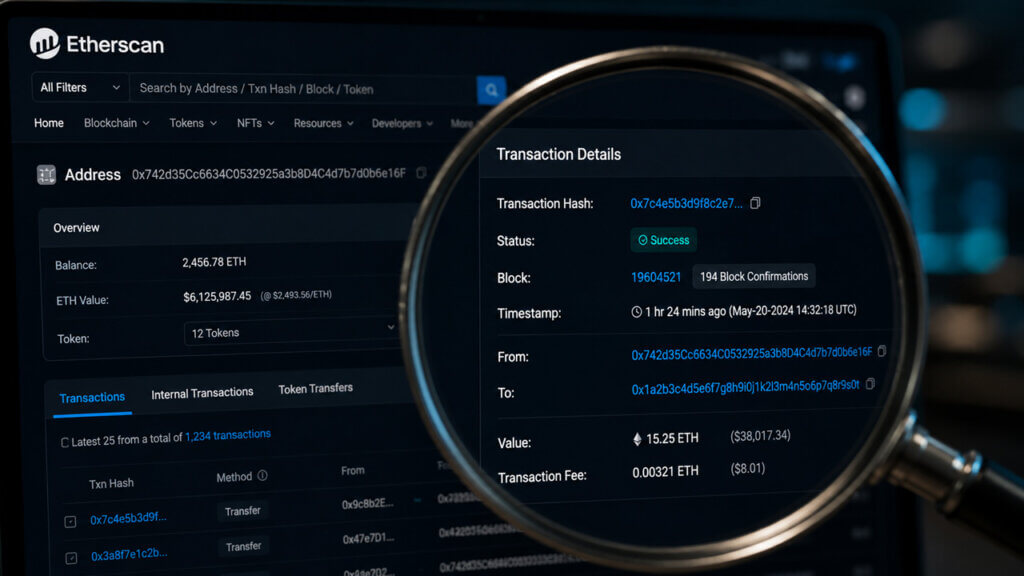
Etherscan is a public search tool for the Ethereum blockchain. You type in a transaction hash, wallet address, or contract address, and it returns the corresponding record from Ethereum's public ledger. That is the entire premise. It does not hold your funds, approve transactions on your behalf, or undo anything that has already confirmed on-chain.
Key Takeaways
- Etherscan makes Ethereum transactions, wallet addresses, tokens, blocks, and smart contracts searchable.
- It helps users verify on-chain activity before trusting a wallet, exchange, dapp, or developer tool.
- Contract pages, token trackers, gas tools, and transaction tabs answer different questions, so the right tab matters.
- Etherscan can show what happened on-chain, but it cannot recover funds or prove that a contract is safe.
What Is Etherscan?
Etherscan is a blockchain explorer for Ethereum blockchain. A blockchain explorer is a search engine for public ledger data, so users can look up transactions, addresses, blocks, token pages, smart contracts, labels, gas data, and analytics from one interface.
The service is independently operated and indexes Ethereum's public ledger for users who need readable transaction history. That includes beginners checking whether ETH arrived, traders comparing wallet activity, developers verifying contracts, and support teams asking for a transaction hash.
The key thing to understand from the start is that Etherscan is read-only by default. An Etherscan page is not the same as a wallet. It can display a wallet address and its public balances, but it does not control the private keys behind that address. The wallet, exchange, or smart contract signs and submits actions. Etherscan just shows you what already happened.
Remember, Etherscan can tell you a transaction exists. It cannot tell you whether you made a mistake or help you fix one.
What Etherscan Can Show You
Etherscan can show public Ethereum records, but it cannot act as the owner of those records. That distinction is the first safety check because many users open Etherscan only after a transfer, swap, bridge, or approval has become confusing.
An Etherscan wallet does not exist. Wallet software signs transactions, and Ethereum wallet options help users control addresses. Etherscan only displays what the chain, contracts, and indexed labels make public.
| Etherscan Can Show | Etherscan Cannot Do |
|---|---|
| Transaction status, hash, block, timestamp, and fee | Reverse or redirect a confirmed transaction |
| Wallet balances, token holdings, NFTs, and transfers | Store private keys or seed phrases |
| Contract source code, ABI, events, and write functions | Guarantee that a verified contract is safe |
| Gas estimates, blocks, labels, and analytics | Recover lost assets or approve actions alone |
If you only need to check whether a transfer happened, Etherscan is enough. If you need to send funds, sign a message, recover an account, or manage custody, you need a wallet or platform account. New users who discover that gap should start with wallets for beginners before signing anything.
How to Use Etherscan.io
Etherscan.io search starts with the identifier you already have. Paste a transaction hash, wallet address, contract address, block number, token name, or ENS name into the search bar, then confirm that the result matches the network and object type you intended.
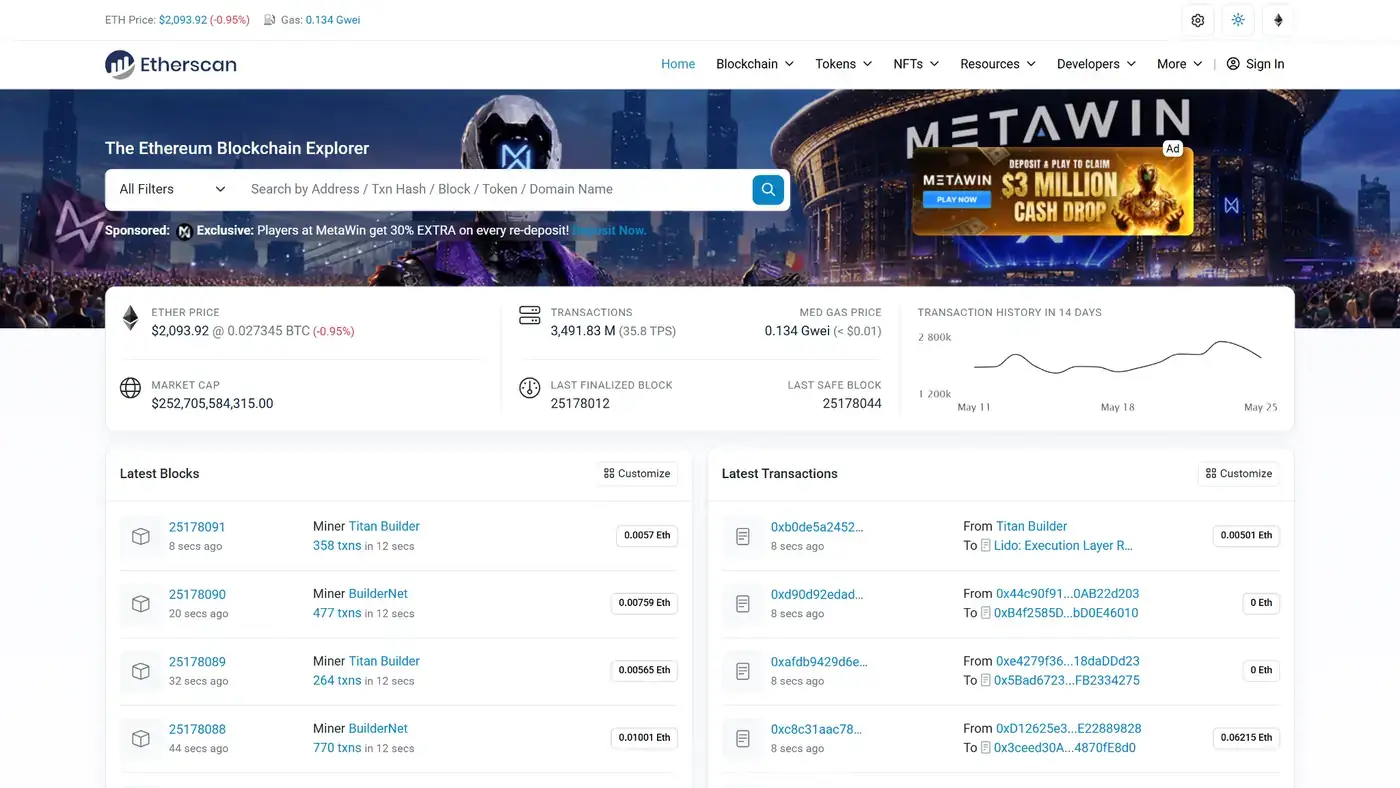
The search bar supports addresses, transactions, tokens, projects, block numbers, token names, and domain names.
| What You Have | Where Etherscan Takes You |
|---|---|
| Transaction hash | Transaction page with status, fee, value, and logs |
| Wallet address | Address page with balances, transfers, NFTs, and approvals |
| Contract address | Contract page with code, events, token details, and read or write tabs |
| Block number | Block page with validator, timestamp, gas use, and transactions |
| Token name or ticker | Token tracker page, if the result is the correct contract |
| ENS name | Address result connected to that readable name |
For testnets, open the matching explorer before searching. Sepolia Etherscan is for Sepolia activity, not mainnet funds. A hash that works on a testnet explorer does not prove anything happened on Ethereum Mainnet.
How to Read an Etherscan Transaction
An Etherscan transaction page explains one submitted Ethereum transaction. The safest way to read it is to start with the status, then check who sent it, where it went, what value moved, what method ran, and what fee was paid.
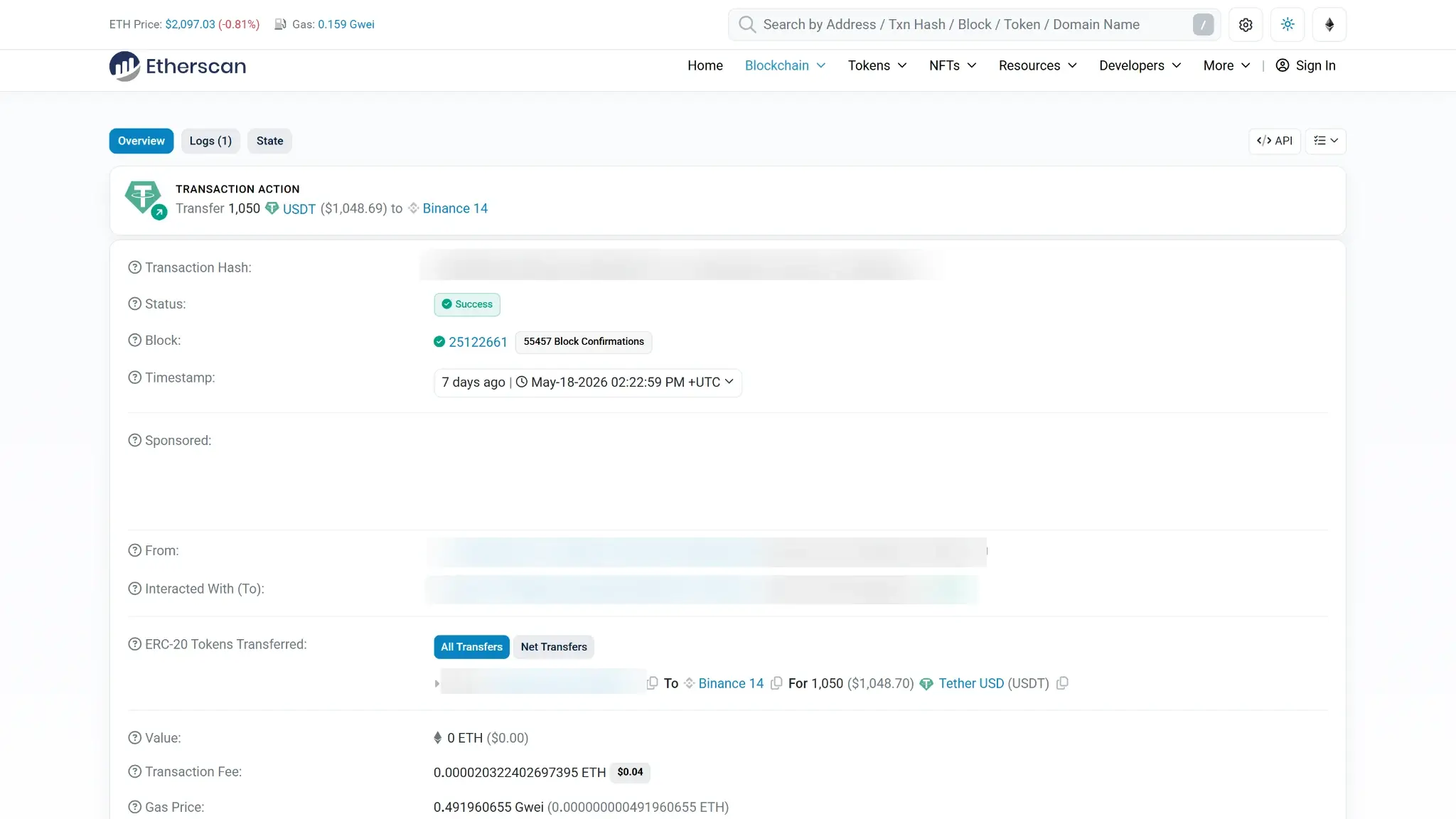
A normal transfer is easier than a contract call. A transaction can show Success while the user-facing action still disappoints you. For example, an approval can succeed while the later swap, mint, or claim never happens.
| Field | What It Tells You |
|---|---|
| TxHash | The unique transaction identifier to share with support or a counterparty |
| Status | Whether the transaction succeeded, failed, is pending, or was dropped and replaced |
| Block And Timestamp | When the transaction entered the chain and how many confirmations followed |
| From And To | The sending address and the receiving address or contract |
| Value | ETH sent directly, separate from token movements inside a contract |
| Transaction Fee | Gas used multiplied by the effective gas price |
| Nonce | The sender's transaction sequence number |
| Method And Logs | The contract function and emitted events, when decoded |
In a simple ETH transfer, the From address sends value to the To address, and the transaction fee is paid in ETH. The Ethereum network asset is used both for value transfers and gas on Ethereum.
In a smart contract interaction, the visible value may be zero even though tokens moved inside the logs. The method label, token transfers, internal transactions, and events give more context.
The nonce field is worth understanding. Every Ethereum transaction from a given address is assigned a number in sequence, starting at zero. If a transaction is stuck or pending, this number tells you exactly where it sits in the queue. A new transaction using the same nonce will replace the original, which is what the “dropped and replaced” status refers to.
Dropped and replaced transactions need special care. A dropped transaction is not recorded on-chain, and another transaction from the same sender can replace it by using the same nonce.
How to Check Wallets, Tokens, NFTs, and Address Privacy on Etherscan
An address page shows the public activity connected to one Ethereum address. It can show ETH balance, token holdings, NFT transfers, internal transactions, contract interactions, analytics, labels, and tabs that help separate direct transfers from token events.
Those records are public. Etherscan can show activity tied to an address, but it cannot tell whether the owner is one person, an exchange, a contract, a scammer, a DAO, or a shared treasury unless labels and outside context make that clear.
That public nature has real consequences for privacy. Every token you hold and every contract you have interacted with is visible to anyone who has your address. This is not a flaw in Etherscan specifically, it is how a public blockchain works. If privacy matters to you, this anonymous wallet comparison list covers that for you.
Before relying on an address or token page, run through these checks:
- Verify the full address from a trusted source.
- Do not copy recipient addresses from random transaction history.
- Check whether token pages have reputation warnings or suspicious labels.
- Assume unsolicited tokens and NFTs are spam until proven otherwise.
- Compare NFT token IDs and contract addresses, not only names or images.
- Keep private wallets separate from public address labels.
Address poisoning is the common copy-paste trap. An attacker can send tiny transfers from a lookalike address so it appears in recent history. Etherscan can reveal the full address, but the user still has to compare it before signing.
How to Use Etherscan Gas Tracker
Etherscan Gas Tracker helps users estimate Ethereum transaction fees before they submit a transaction. It displays gas-price recommendations in Gwei, which is the unit wallets commonly use for Ethereum gas.
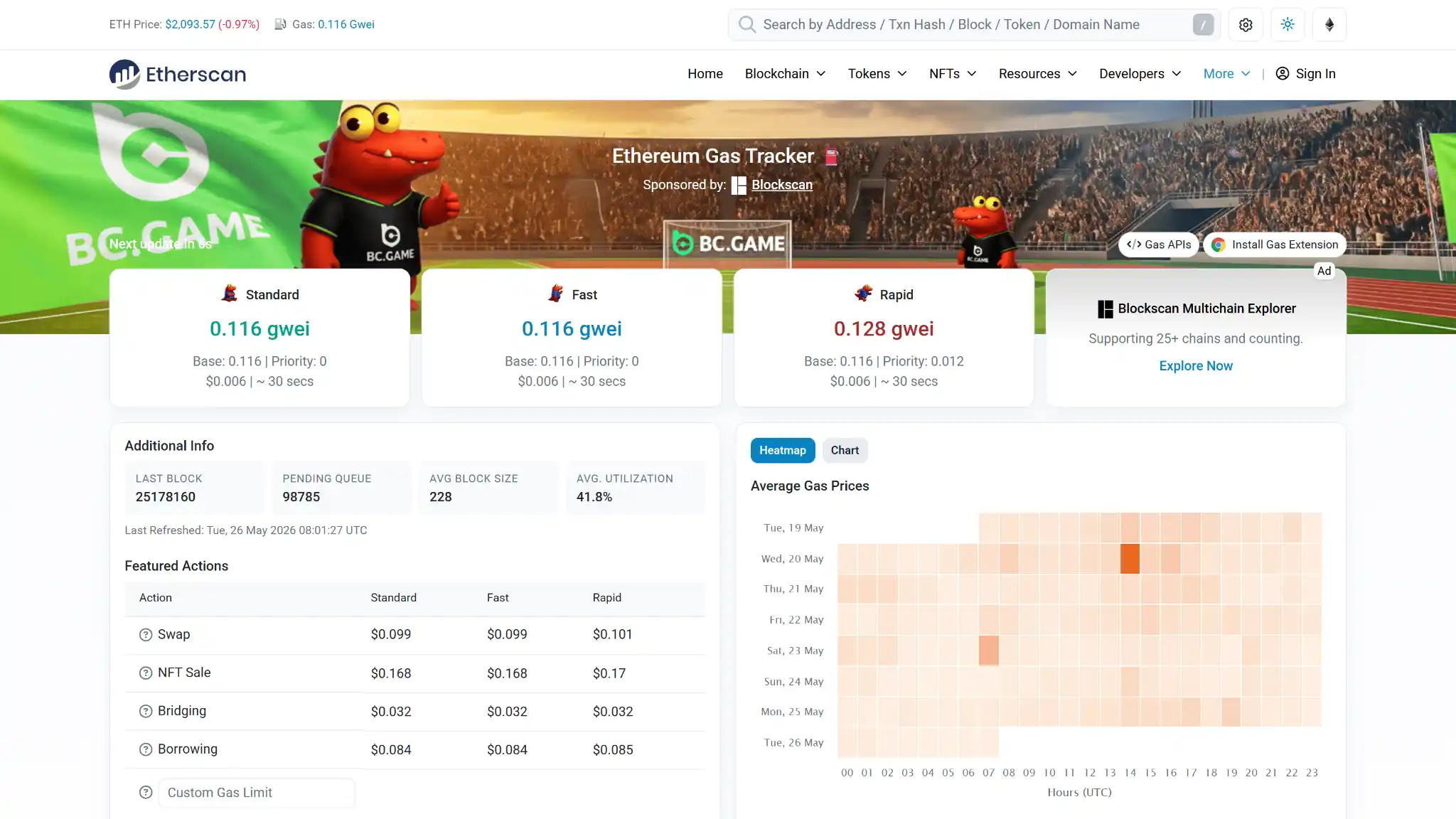
Gas is the fee Ethereum charges for any on-chain action, from a simple ETH transfer to a complex contract interaction. The amount you pay depends on how busy the network is at that moment. The Gas Tracker gives you a real-time estimate so you can decide whether to send now or wait for a quieter period.
| Gas Tracker Term | Plain-English Meaning |
|---|---|
| Safe Or Low | Lower suggested fee that may confirm more slowly |
| Proposed Or Average | Middle estimate for ordinary confirmation speed |
| Fast | Higher estimate for faster inclusion during busier periods |
| Base Fee | Protocol fee that changes with network demand |
| Priority Fee | Extra tip paid to encourage inclusion |
EIP-1559 introduced the base-fee and priority-fee model for Ethereum. Under EIP-1559, the base fee adjusts with block demand, while users can set limits through wallet fee settings.
Your wallet will show a final gas prompt before any transaction. That prompt reflects the actual transaction being signed, which makes it more accurate than the Gas Tracker estimate for that specific action. Use the tracker to get a sense of network conditions, then rely on your wallet for the final number.
How to Inspect Smart Contracts Before You Sign
A contract page helps users inspect what a smart contract is and how it can be used. Start with the contract address, source-code status, token reputation, labels, read functions, write functions, and any third-party risk cards before connecting a wallet.
Verified source code means the published code matches deployed bytecode at a certain verification level. It does not mean the contract has been audited, does not contain risky functions, or cannot be upgraded through a proxy.
| Signal | What It Can And Cannot Prove |
|---|---|
| Verified Source Code | Shows readable code, but not automatic safety |
| Unverified Contract | Hides source details, increasing signing risk |
| Similar Match | Suggests matching bytecode from another verified explorer, with limits |
| Exact Match | Includes deployment details and constructor arguments |
| Runtime Match | Matches runtime bytecode, but not full deployment history |
| Read Contract | Lets users view public data without gas |
| Write Contract | Submits wallet-signed transactions that can change state |
The Read Contract tab lets you query public data from a contract without paying gas or signing anything. This is useful for checking token balances, pool states, or any variable the contract exposes publicly. The Write Contract tab is different. Anything you submit there goes on-chain, costs gas, and cannot be undone. Treat every Write action the same way you would treat sending funds.
Source-code verification improves transparency for users who need to understand what they are digitally signing. Etherscan separates contract states into unverified, similar match, exact match, and runtime match.
How Developers Use Etherscan API, Sepolia, and Contract Verification
Developers use Etherscan for indexed Ethereum data, API access, source-code verification, testnet debugging, ABI lookup, and contract-read workflows. The Etherscan API is especially useful when an app needs transaction history, token transfers, logs, contract source, or gas data without running its own indexer.
API V2 uses one account and API key across Ethereum and other EVM-compatible chains, with chainid selecting the target network. API V2 covers more than 60 supported chains, including BNB Smart Chain, Base, and Arbitrum.
| Developer Task | Where Etherscan Fits |
|---|---|
| Fetch transaction history | Account and transaction endpoints |
| Decode token transfers | ERC-20, ERC-721, ERC-1155, and log endpoints |
| Check gas data | Gas tracker API and wallet fee checks |
| Verify source code | Manual verifier or tool integrations |
| Debug testnet activity | Sepolia Etherscan and chain-specific explorers |
| Compare EVM chains | chainid and supported-chain tables |
Sepolia Etherscan is the right explorer for Sepolia testnet transactions and contract verification. The supported-chain list includes Sepolia with chain ID 11155111, while chain-specific examples such as Base and Arbitrum show why the right chain ID matters.
Etherscan Alternatives and When to Use Them
Etherscan is the default explorer for Ethereum, but it is not the only place to verify a transaction or contract. The right alternative depends on whether you need chain-specific data, open-source explorer code, source-code verification, wallet history, or exchange withdrawal status.
A wallet history can show what your wallet app knows. An exchange screen can show whether a withdrawal left the platform. The blockchain explorer shows whether the transaction reached the chain.
| Tool | Best Use |
|---|---|
| Etherscan | Ethereum mainnet transactions, addresses, gas, contracts, and approvals |
| Sepolia Etherscan | Sepolia testnet debugging and verification |
| Blockscout | Open-source explorer deployments across many chains |
| Sourcify | Open contract verification workflows |
| Wallet history | Local signing history and app labels |
| Exchange withdrawal page | Platform processing status before or after an on-chain hash exists |
If an exchange marks a withdrawal complete, search the transaction hash on the right explorer and compare the destination address. If the hash does not exist yet, the issue may still be inside the platform's processing system, where crypto exchange support paths are more relevant than another explorer.
For users who want a broader comparison of explorer tools, the blockchain explorer category lists the main options.
FAQs
Is Etherscan a wallet?
No. Etherscan is not a wallet and does not store private keys, seed phrases, or funds. It shows public Ethereum data. A wallet signs transactions and controls addresses.
Can Etherscan reverse a transaction?
No. Etherscan cannot reverse, redirect, or recover a confirmed Ethereum transaction. It can help verify the transaction hash, destination, status, fee, and logs so you know what happened.
Do you need an account to use Etherscan?
No. Most search, transaction, address, token, gas, and contract pages are usable without an account. Accounts are mainly for features such as watchlists, API keys, alerts, labels, and saved settings.
How do you check current gas price or Gwei on Etherscan?
Open Etherscan Gas Tracker or use the gas tracker API, then compare safe, proposed, fast, base-fee, and priority-fee estimates with your wallet prompt. Do not rely on old Gwei numbers.
What does verified contract mean on Etherscan?
A verified contract has published source code that matches deployed bytecode under Etherscan’s verification rules. It improves transparency, but it is not an audit and does not prove the contract is safe.
Is it safe to connect your wallet to Etherscan?
Connecting can be safe when you open the real site and understand why the connection is needed. Search and read-only checks do not need a wallet, while revoking approvals or writing to a contract does.