
Overview
Introduction
Solana processes thousands of transactions per second, but your wallet app only shows you a simplified version of what happened. Solscan fills the gap. It's a public explorer that reads raw Solana data and turns it into something a human can actually interpret: transaction status, wallet balances, token holder charts, program interactions, and more.
You don't need to connect a wallet or share any private information to use it. Every search is read-only, and the blockchain data it pulls is already public. That makes Solscan the safest first stop when a transfer looks wrong, a token seems off, or a swap failed without a clear reason.
This guide walks through the main features, how to read a transaction correctly, and what Solscan can't do.
Key Takeaways
- Solscan is a public search tool for Solana activity, not a wallet, exchange, or recovery service.
- It helps users verify transaction status, wallet balances, token holders, and program activity.
- Explorer data is most useful when users check signatures, addresses, token mints, and program interactions together.
- Solscan can show what happened on-chain, but it cannot prove intent, reverse transfers, or make a token safe.
What Is Solscan?
Solscan takes public Solana activity and turns it into searchable browser pages. It indexes everything the Solana blockchain records, then organizes transaction signatures, wallet addresses, token mint addresses, blocks, programs, and NFT records so you can inspect them without running a node or writing a single line of code.
Most new Solana users run into Solscan for the first time when something goes wrong: a wallet app shows the wrong balance, a swap looks stuck, or a token transfer never seems to arrive. Those are exactly the situations Solscan is built for. Because Solana processes transactions in fractions of a second using accounts, programs, and token accounts, the raw data behind any action can be hard to read without a tool that decodes it.
How Solscan Turns Solana Data Into Readable Pages
When you paste any identifier into Solscan's search bar, the explorer retrieves and decodes the matching blockchain record so you can read it in plain language. A user can paste a signature, wallet address, token mint, program ID, block, or NFT collection into search instead of querying a node directly.
That makes Solscan a layer between raw chain records and a wallet interface. The blockchain explorer tools category covers this same role across networks: explorers are not the blockchain itself, but they make public blockchain data easier to search, filter, and compare.
Different search inputs answer different questions. The table below shows what each one reveals.
| Search Input | What It Can Show |
|---|---|
| Transaction signature | Status, slot, fee, signer, instructions, balance changes, and logs. |
| Wallet address | SOL balance, SPL balances, NFTs, transfers, staking accounts, and activity history. |
| Token mint address | Supply, holders, authority fields, markets, transfers, and distribution clues. |
| Program ID | Activity linked to a specific Solana program or dapp. |
| Block or slot | Transactions included at a specific point in chain history. |
The labels and dashboards Solscan adds are interpretation layers, not ground truth. If a label looks wrong, a token name appears spoofed, or a program action is unclear, compare the mint address, account owner, and raw instruction details before trusting the surface display.
What a Transaction Signature Is (And Why You Need It)
A transaction signature, sometimes called a transaction hash or transaction ID, is the unique identifier the Solana network assigns to every transaction the moment it is submitted. Think of it like a tracking number for a parcel: it doesn't matter which wallet app you used or which exchange processed the withdrawal, the signature always points to the same immutable record on-chain.
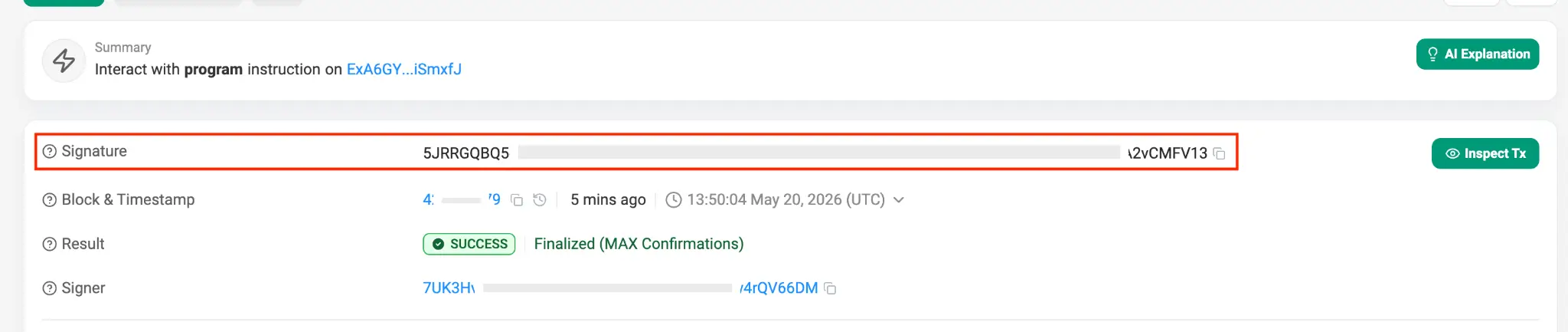
You can find the signature in your wallet's transaction history, in your exchange's withdrawal confirmation email, or in the confirmation screen of any dapp after you approve an action. It is a long string of letters and numbers, usually starting with a number or uppercase letter. Copy it exactly, paste it into Solscan search, and the explorer retrieves the matching record.
How To Look Up A Solana Transaction On Solscan
To look up a Solana transaction on Solscan, copy the transaction signature from a wallet, exchange, or dapp, paste it into Solscan search, then read the status, signer, fee, instructions, balance changes, and logs.
A transaction page separates a confirmed blockchain event from a display problem inside an app. If the signature cannot be found, the transaction may not have reached the network, the app may be showing a local error, or the identifier is wrong. Either way, Solscan gives you a definitive answer rather than a guess.
Check the transaction page fields in this order.
| Field | What To Check |
|---|---|
| Result | Whether the transaction succeeded, failed, or finalized. |
| Slot or block | Where the transaction landed in Solana chain history. |
| Timestamp | When the explorer indexed the event. |
| Signer | Which wallet or authority approved the transaction. |
| Fee | Whether SOL was spent on transaction fees. |
| Instructions | Which programs ran and what actions they attempted. |
| Balance changes | Which accounts gained or lost SOL or tokens. |
| Logs | Error messages or program output behind a failed action. |
Fees are easy to misread. SOL is the native fee asset on Solana, so a transaction can change your SOL balance even when the token amount you transferred did not move. Solana's transaction model explains why fees can still apply when atomic execution fails.
If the page shows a successful result and the destination address matches yours, the chain recorded the transfer. If your exchange or wallet still does not show the updated balance, the next step is contacting that service's support team directly, not running another Solscan search.
How To Check A Wallet Address Without Connecting A Wallet
To check a wallet address on Solscan, paste the public address into search and review balances, token accounts, NFTs, transfers, staking accounts, and DeFi activity. You do not need to connect a wallet or sign anything. Public address lookup requires no seed phrase or approval prompt.
This is one of Solscan's most useful properties for beginners. A wallet app controls your private keys and signs transactions on your behalf, while Solscan only reads the public record. Those are two completely separate functions. Understanding the difference matters especially when you are choosing where to store your funds, since wallet choice affects custody, recovery, and supported networks. You can browse our full list of Solana wallets for a side-by-side comparison.
Once you have a wallet address open in Solscan, here is what to look for.
- Confirm the address matches the one you intended to inspect.
- Review SOL and SPL balances separately, since they appear in different sections.
- Open token accounts when a balance looks missing or lower than expected.
- Check recent SOL and token transfers to confirm activity you recognize.
- Inspect staking accounts if the wallet has delegated SOL to a validator.
- Compare NFT activity with the relevant collection page.
- Look for unexpected signers or unfamiliar dapp interactions in the history.
The staking view deserves a closer look if you hold staked SOL. It shows delegated stake, rewards, and validator-related account activity, which connects to staking more broadly. A line that looks like a missing balance is often delegated stake sitting in a separate staking account rather than the main wallet balance.
Solscan can confirm that an address exists and show its full public history. It cannot identify the real-world person behind that address unless the address has been linked to an identity elsewhere, and it cannot tell whether the account was hacked, tricked into a bad approval, or operating normally.
How To Research Solana Tokens, Holders, And NFTs
To research a Solana token on Solscan, start with the mint address rather than the ticker. Tickers and names can be copied by anyone launching a new token, but the mint address points to the actual on-chain record. Typing the ticker into search may return the wrong asset entirely.
Token pages on Solscan are useful because Solana's account model separates the mint from the accounts that hold units of that mint. Solana token records include mint accounts, token accounts, owners, amounts, mint authority, and freeze authority, which are core risk fields. For beginners, the most important of these are mint authority and freeze authority, explained in the table below.
These signals are worth checking before buying or interacting with any token, though none of them alone confirms safety.
| Signal | What It May Indicate |
|---|---|
| Mint address | Whether you are viewing the real asset or a copycat. |
| Holder concentration | Whether a few wallets can dominate supply. |
| Mint authority | Whether new supply may still be created. |
| Freeze authority | Whether token accounts can be frozen. |
| DEX pairs | Where the token trades and how thin liquidity may be. |
| Transfer history | Whether activity looks organic, bundled, or suspicious. |
| NFT collection activity | Whether mints, sales, and transfers match the collection story. |
One thing to watch for: a large single wallet holding most of the supply is not automatically a warning sign. A large holder may be an exchange, market maker, bridge, treasury, or program-controlled address. A revoked authority can reduce one risk while leaving liquidity, ownership, code, and social-engineering risks untouched. Always check what the holder address actually is before drawing conclusions.
How To Use Solscan For Failed Transactions And Missing Funds
When funds appear missing or a transaction shows failed, the most important step is separating three questions: did the transaction reach the network, did it complete successfully, and did the receiving service credit it? These often have different answers and different fixes.
A failed transaction usually means the attempted instructions did not complete. Solana transactions are atomic, so the important action can fail while fees still apply. Common causes include insufficient SOL for fees, slippage on a swap, stale blockhashes, failed program checks, network congestion, unsupported token accounts, or a dapp route that changed before you confirmed.
Work through this checklist before contacting support or retrying a transaction.
- Confirm the URL you are using is solscan.io.
- Search the transaction signature, not just the wallet address.
- Check the result field, signer, destination address, and balance changes.
- Compare SOL transfers and SPL token transfers separately, since they appear in different rows.
- Look for close-account, burn, freeze, or create-account actions in the instructions.
- Check whether an exchange deposit address required a memo or specific network selection.
- Contact the wallet, exchange, or dapp when the issue is off-chain, since Solscan cannot resolve service-side problems.
Exchange deposits need a separate check. A successful on-chain withdrawal does not guarantee instant exchange credit. Here's a list of the best decentralized crypto exchanges if you need to compare routing options.
Solscan API And The Token Holders Endpoint
The Solscan API is for developers who need structured Solana data rather than manual explorer pages. Manual browsing covers ordinary lookups. API use adds authentication, request limits, pagination, and data-volume planning.
For the token holders endpoint, the current v2 route is https://pro-api.solscan.io/v2.0/token/holders. The v2 token holders reference uses address for the token mint, page for pagination, page_size values such as 10, 20, 30, or 40, and optional amount or USD-value filters.
Before copying any code snippet you find online, check the version it targets.
- Older public API examples for Solscan token holders may point to legacy routes instead of the current v2 endpoint. The older v1 form used tokenAddress, limit, and offset, while the v2 route returns holder items with token-account address, owner, amount, decimals, rank, value, and percentage.
The table below covers the most common API needs for anyone building on Solscan data.
| Need | Where To Look |
|---|---|
| Holder list | /v2.0/token/holders with the token mint address. |
| Pagination | page and page_size in the query string. |
| Balance filters | from_amount, to_amount, from_value, and to_value. |
| Authentication | API key management in a Solscan account. |
| Error handling | 400, 401, 429, and 500 responses. |
| Coverage | Endpoint categories for account, token, NFT, transaction, block, market, and program data. |
One field worth extra attention: the owner field is important because the address holding tokens may be a token account, not the human-readable wallet users expect. Use the Solscan token holders endpoint as a data source for analysis, not as a verdict on whether holders are insiders, exchanges, or ordinary users.
Solscan Safety, Privacy, And Common Limits
Solscan is safe for read-only lookup when you visit the real domain, avoid fake support links, and never enter a seed phrase. Standard searches do not require wallet connection, private keys, or recovery words.
The safety risks around Solscan are not from the tool itself, they come from lookalike sites, phishing links shared in Discord or Telegram, and fake “support” accounts that offer to help recover funds if you paste your seed phrase into a form. None of that is Solscan. A real Solscan search for a transaction, wallet, or token page should never ask you to connect a wallet or share private information.
Run through this checklist before trusting any Solscan page or related prompt.
- Type solscan.io directly into your browser or use a saved bookmark.
- Do not connect a wallet for ordinary address or transaction lookup.
- Never enter a seed phrase, private key, or recovery code anywhere on the site.
- Compare the full mint address, not only the token name or ticker.
- Read labels as helpful hints, not confirmed identity proof.
- Ignore recovery DMs and paid “unlock” offers in any form.
- Cross-check with another explorer when a parse result looks odd.
Privacy has real limits here. A wallet address can reveal public activity across all of Solana, including transfers, token balances, NFT interactions, and some dapp use. It does not automatically reveal a legal identity, but once an address is linked to a person through an exchange account, public post, or social profile, past activity becomes easier to connect. Understanding what a wallet address is and how it differs from a private key matters before you share any address publicly.
Recovery has harder limits. Solscan cannot reverse a transfer, freeze a scammer's wallet, restore a lost seed phrase, or force a token issuer to thaw an account. No explorer can.
Solscan Vs Solana Explorer, SolanaFM, And API Tools
Solscan is strongest for beginner-friendly Solana lookups, while Solana Explorer, SolanaFM, and API tools suit cross-checking raw records, alternate decoding, or developer workflows. The right choice depends on the question in front of you.
Use a second tool when a page label looks unclear, when transaction ordering matters, or when a dapp-specific action needs deeper decoding. Two explorers disagreeing on a label while showing the same signature, slot, signer, and balance changes usually means the underlying record is identical and only the presentation differs.
| Tool | Best Fit |
|---|---|
| Solscan | Fast searches, readable wallet pages, token holders, NFTs, dashboards, and common troubleshooting. |
| Solana Explorer | Official network-level checks, blocks, transactions, and raw explorer comparison. |
| SolanaFM | Alternate wallet, token, and transaction views when Solscan parsing is unclear. |
| Helius or RPC tools | Developer queries, raw account data, custom indexing, and execution-order analysis. |
| API analytics tools | Large token-holder, market, or historical datasets beyond manual explorer pages. |
For most users, the right pattern is: start with Solscan, confirm with another explorer when the result affects money, then use developer tools only when the browser view cannot answer the question.
FAQs
What is Solscan used for?
Solscan is used to search Solana transactions, wallet addresses, token mint pages, NFT activity, program interactions, blocks, holders, and API-backed data. Most users rely on it to confirm whether a transfer succeeded, why a swap failed, what a wallet holds, or how concentrated a token’s supply looks.
Is Solscan a wallet?
No. Solscan does not store private keys, sign transactions, hold funds, or recover accounts. It can display a wallet address and its public activity, but only a wallet app or signing device can control that address.
Is Solscan safe to use?
Solscan is safe for normal read-only lookup when you visit the real solscan.io domain and do not enter secrets. A transaction search, wallet address lookup, or token page view should never require a seed phrase, private key, recovery code, or support chat.
What does a failed transaction mean on Solscan?
A failed transaction means the attempted Solana instructions did not complete successfully, even though the network may still record the attempt and charge fees. Check the logs, signer, fee, program, and error message before retrying, because the cause may be slippage, insufficient SOL, account setup, or a dapp-specific rule.
Does Solscan have a public API token holders endpoint?
Yes, but current developer work should target the Solscan Pro API v2 token holders endpoint rather than older public-api snippets. The current route is /v2.0/token/holders, with a required token mint address, pagination fields, optional amount or value filters, and API-key authentication.
Can Solscan show who owns a wallet address?
Solscan shows public wallet activity, labels, balances, and transactions, but it cannot reliably identify the real-world owner of an address by itself. Identity depends on outside links such as exchange records, public posts, known labels, or address reuse.